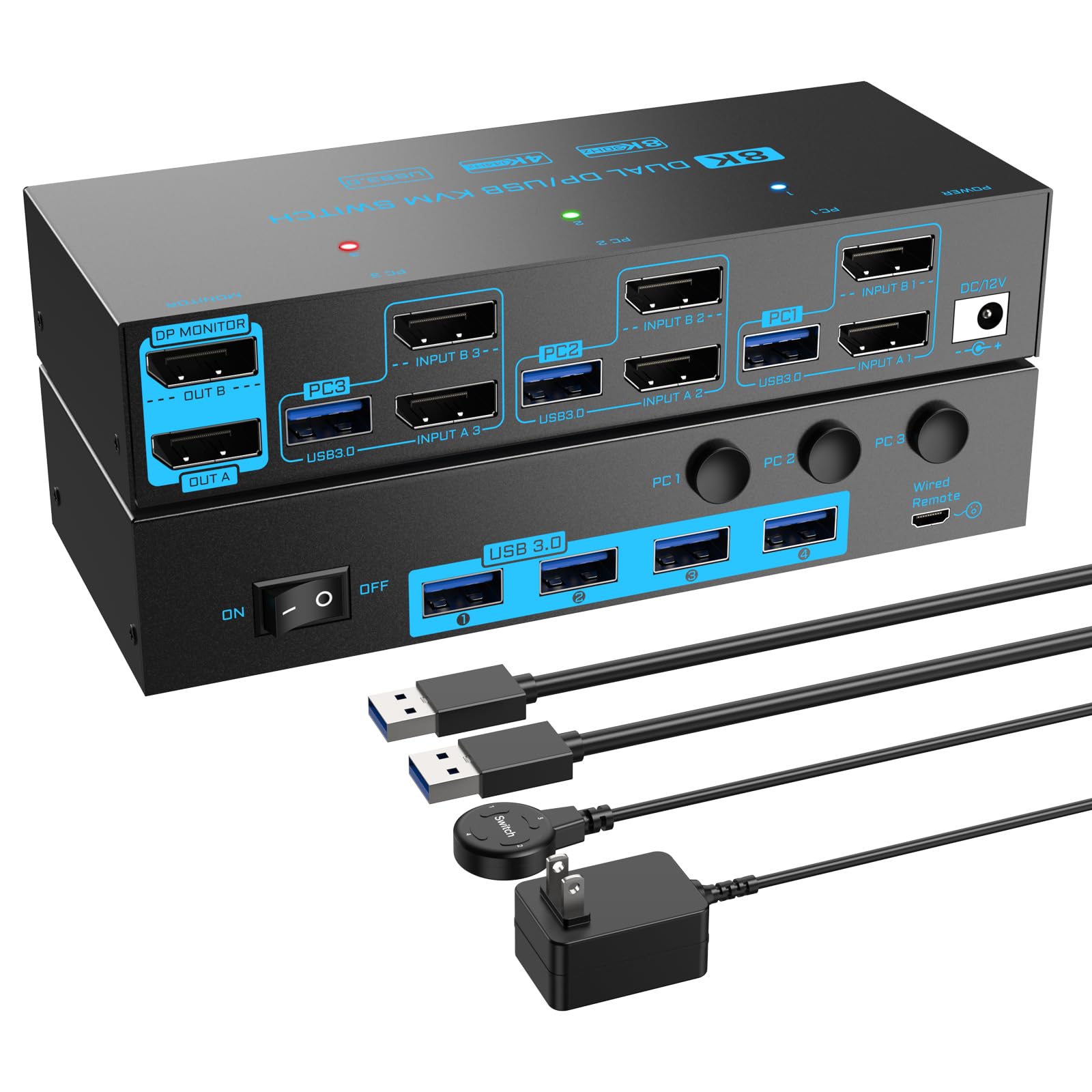



【Displayport KVM Switch 2 Monitors 3 Computers】The 3 computers 2 monitors displayport 1.4 kvm switch is mainly designed to share 2 DP monitors and 4 USB 3.0 devices between 3 computers, just plug and play, one-click switching, making it an ideal solution for home offices, multimedia classrooms, business meeting rooms, and gaming setups. 𝙉𝙤𝙩𝙚: Please ensure each PC has 2 DP+1 USB ports and connect to the relevant ports on the 3 computers KVM switch to get 2 external screens 【Ultra 8K Dual Monitor KVM Switch 3 Computers】The dual monitor displayport 1.4 kvm switch is compliant with DP 1.4 standard, supports max resolution up to 8K(7680*4320)@30Hz, 4K(3840*2160)@144Hz and is backward compatible with lower resolution , which allows you enjoy stunning visual experience and smooth gaming experience at the same time. 𝙉𝙤𝙩𝙚: To reach the max resolution, please ensure the sources, monitors, DP cables all support the resolution 【5Gbps USB 3.0 Displayport KVM Switch 2 Monitors】The USB 3.0 DP1.4 dual monitor 3 computers kvm features 4 USB 3.0 ports for connecting keyboards, mice, USB drives, printers, USB cameras and other USB devices. Data transfer rate up to 5Gbps, which enables rapid file transfer between connected computers to improve work efficiency. 𝙉𝙤𝙩𝙚: Please connect the USB cable from 3 computers to make the USB devices work properly 【Broad Compatibility & 2 Switching Ways】 The 8K 2 monitors 3 computers KVM Switch is compatible with laptops, desktops, PS4, Raspberry Pi, DVR and most operating systems, such as Windows, Mac OS, Chrome OS, etc. 2 monitor kvm also offers both physical button and 1.5M wired switching options, relevant LED indicators clearly show the active computer, which are easy to switch and make your workspace tidier 【External 12V Power Port & Power Switch】The 3 computers 2 monitors kvm switch is equipped with a 12V power port for high power USB devices and a separate power switch. Simply press the power switch to restart the dual monitor KVM when signal re-recognition is needed, eliminating the hassle of repetitive plug and unplug actions 【Important Note & Worry-Free Shopping】(1) Each PC needs 2*DP+1*USB cable to be connected to get 2 screens output; (2) Before connecting the 3 pcs 2 monitors kvm, please connect your computers to 2 monitors directly to ensure that multi-screen output is supported. (3) All our products come with 12 months after-sales service, if you need any technical support or replacement service, please feel free to contact us, our professional technical team will reply you within 24 hours 8K/4K USB 3.0 dual monitor displayport KVM Switch for 3 Computers Share 2 Monitors and 4 USB 3.0 Devices
The 3 computers 2 monitors displayport 1.4 kvm switch is mainly designed to connect 3 computers to two high-definition monitors and four USB 3.0 devices, which can greatly elevate your multitasking capabilities. The dual monitor kvm switch is ideal for designers, streamers, educators and those who want to manage multiple tasks with just a single click.
Features:
One-click switching between 3 computers to share 2 monitors and 4 USB 3.0 devices Plug and play, no driver or software needed
Compliant with Displayport 1.4 standards, Displayport part supports resolution up to 8K@30Hz/4K@144Hz
Equipped with 4 USB 3.0 port for connecting keyboard, mouse, USB camera, U-Disk,scanner and other USB devices; Data transfer rate is up to 5Gbps, more stable and faster than USB 2.0 version
Equipped with DC 12V/1A power supply for high power USB devices
Supports two display modes: Duplicate and Extend mode
Cross support major operation systems including Windows, Mac and more
Come with a 1.5M wired remote controller, easy to switch signal.
Experience an Unparalleled 8K Visual Experience
Note: The final resolution depends on your graphics cards, monitors, cables and adapters
Warm Tips:
(1) Before connecting the 3 pcs 2 monitors DP1.4 kvm switch, please connect your displayport signals to the 2 monitors directly to ensure that each computer supports multiple screen output.
(2) To reach the best performance of the 3 port 2 monitor kvm switch, please use standard DP 1.4 cables within 1.5M
5Gbps Fast and Stable Data Transmission
The 2 monitors 3 computers kvm switch is equipped with 4 USB 3.0 ports for keyboard, mouse, USB camera, scanner and other USB devices, data transfer rate is up to 5Gbps, which is 10 times than USB 2.0.
Note: When you connect some high power USB devices, please plug the included DC 12V/1A power cable to make the Displayport 1.4 kvm switch work with more stable performance
Plug and Play, Easy to Install
Connect Steps:
Step 1. Connect 2*DP cables+1*USB cable between PC 1 and KVM (USB 3.0, INPUT A1, INPUT B1).
Step 2. Connect 2*DP cables+1*USB cable between PC
The 3 computers 2 monitors displayport 1.4 kvm switch is mainly designed to connect 3 computers to two high-definition monitors and four USB 3.0 devices, which can greatly elevate your multitasking capabilities. The dual monitor kvm switch is ideal for designers, streamers, educators and those who want to manage multiple tasks with just a single click.
Features:
One-click switching between 3 computers to share 2 monitors and 4 USB 3.0 devices Plug and play, no driver or software needed
Compliant with Displayport 1.4 standards, Displayport part supports resolution up to 8K@30Hz/4K@144Hz
Equipped with 4 USB 3.0 port for connecting keyboard, mouse, USB camera, U-Disk,scanner and other USB devices; Data transfer rate is up to 5Gbps, more stable and faster than USB 2.0 version
Equipped with DC 12V/1A power supply for high power USB devices
Supports two display modes: Duplicate and Extend mode
Cross support major operation systems including Windows, Mac and more
Come with a 1.5M wired remote controller, easy to switch signal.
Experience an Unparalleled 8K Visual Experience
Note: The final resolution depends on your graphics cards, monitors, cables and adapters
Warm Tips:
(1) Before connecting the 3 pcs 2 monitors DP1.4 kvm switch, please connect your displayport signals to the 2 monitors directly to ensure that each computer supports multiple screen output.
(2) To reach the best performance of the 3 port 2 monitor kvm switch, please use standard DP 1.4 cables within 1.5M
5Gbps Fast and Stable Data Transmission
The 2 monitors 3 computers kvm switch is equipped with 4 USB 3.0 ports for keyboard, mouse, USB camera, scanner and other USB devices, data transfer rate is up to 5Gbps, which is 10 times than USB 2.0.
Note: When you connect some high power USB devices, please plug the included DC 12V/1A power cable to make the Displayport 1.4 kvm switch work with more stable performance
Plug and Play, Easy to Install
Connect Steps:
Step 1. Connect 2*DP cables+1*USB cable between PC 1 and KVM (USB 3.0, INPUT A1, INPUT B1).
Step 2. Connect 2*DP cables+1*USB cable between PC