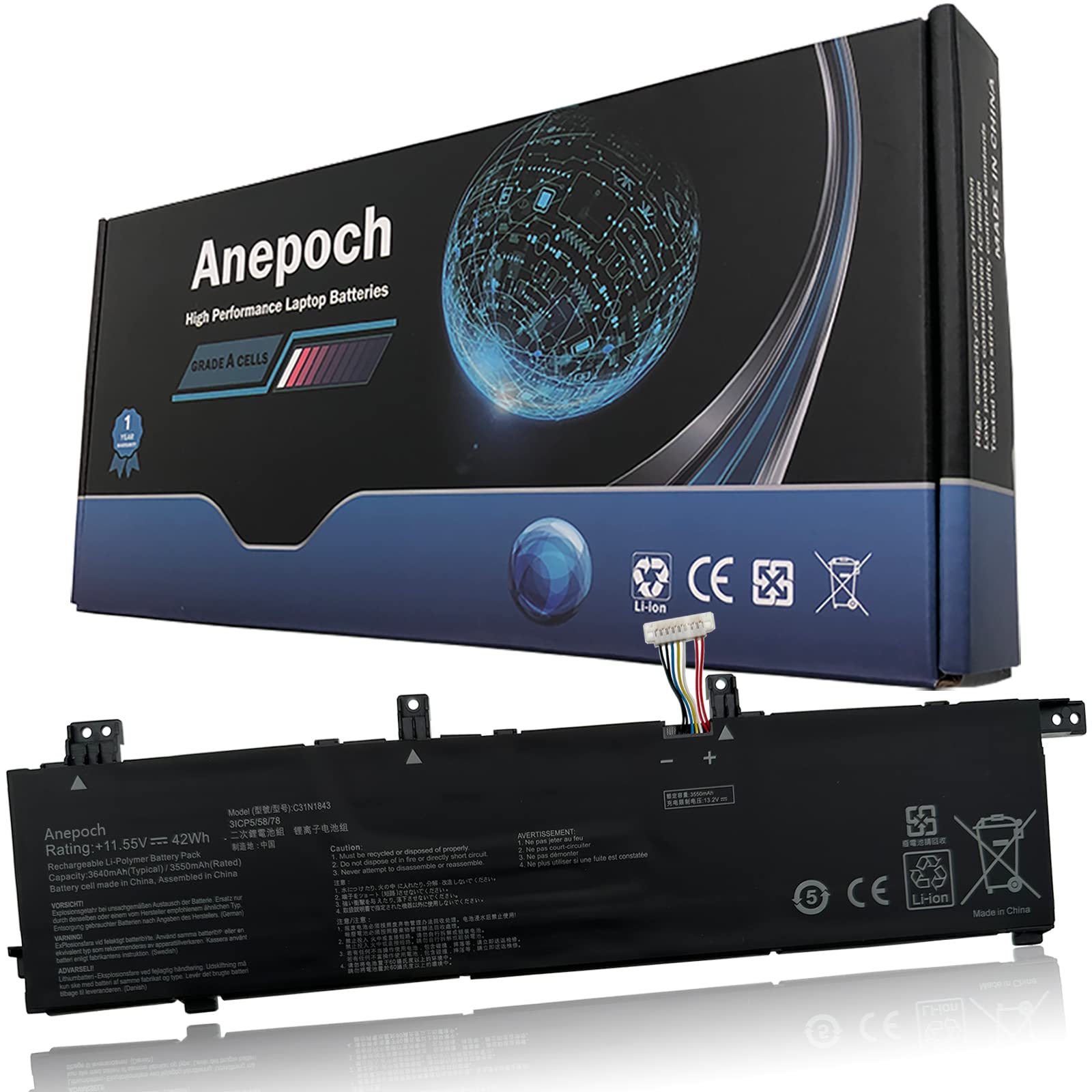



【Model】: C31N1843 ; Voltage: 11.55V ; Capacity: 42Wh 3640mAh. 【Replacement for Part Number】: C31N1843 0B200-03430000 0B20003430000 3ICP5/58/78 【Compatible Models】: For Asus VivoBook S14 S432 S432FA S432FL S432FA-EB008T S432FA-EB003T S432FA-EB025T S432FA-EB001T S432FA-EB064T S432FL-EB087T Series; Fit for Asus VivoBook S15 S532 S532FA S532FL S532FL-BQ502T S532FL-DB77 S532FL-EB71 S532FL-BQ006T S532FL-BQ028T S532FL-BQ003T S532FL-BQ049T S532FL-BN035T S532FL-BN120T S532FA-DH55 S532FA-BQ064T Series; Fit for Asus Notebook X432FA X432FL X532FA X532FL X532FLC X432FA-2S Series 【Security】: All Anepoch products are Certified by CE, FCC for safety. Strict guidelines for compatibility, and standards compliance for environment safety 【Support】: 24 x 7 Email support, Rest assured with 30 days Refund,12 months Replacement,,if there is any problem, please feel free to contact me and I will solve it for you immediately. ● Battery Condition :Brand New;
● Battery type :Li-ion;
● Capacity :42Wh 3640mAh;
● Voltage :11.55V;
● Support: 24 x 7 Email support, Rest assured with 30 days Refund,12 months Replacement;
● Condition: 100% New from Manufacturer, Grade A Cell
● Replacement for Part Number:
C31N1843 0B200-03430000 0B20003430000 3ICP5/58/78
● Compatible Models:
ASUS X432FA X432FL X432FLC Series
ASUS X532FA X532FL X532FLC Series
ASUS Vivobook S15 S532FA Series
ASUS VivoBook S15 S532FL Series:
S532FL-EB71 S532FL-DB77 S532FL-BQ006T S532FL-BQ003T S532FL-BQ028T S532FL-BQ049T S532FL-BN035T S532FL-BN120T
ASUS VivoBook S14 S432FA Series:
S432FA-EB008T S432FA-EB025T S432FA-EB003T S432FA-EB001T
ASUS VivoBook S14 S432FL Series
● Not all the compatible laptop models have been listed, please open the back case of your laptop and choose the right battery model according to your laptop's origibal batte.
● Note:
1.Before placing your order, we highly suggest you to open the back case of your latptop and check out the exact part number of your laptop's original battery.
2.Discharge the new battery use to 5%(not to 0%) and then charge to 95%, and cycle 3-4 times.
3.Do not disassemble, crush or puncture. Do not dispose of in fire or water.
4.If you remove battery for a long time, charge more than 80% at least one time within one months.
5.Don't connect adapter for a long time while using the battery. It may damage the battery.
6.When using the battery, care should be taken to prevent exposure and moisture.
● Battery type :Li-ion;
● Capacity :42Wh 3640mAh;
● Voltage :11.55V;
● Support: 24 x 7 Email support, Rest assured with 30 days Refund,12 months Replacement;
● Condition: 100% New from Manufacturer, Grade A Cell
● Replacement for Part Number:
C31N1843 0B200-03430000 0B20003430000 3ICP5/58/78
● Compatible Models:
ASUS X432FA X432FL X432FLC Series
ASUS X532FA X532FL X532FLC Series
ASUS Vivobook S15 S532FA Series
ASUS VivoBook S15 S532FL Series:
S532FL-EB71 S532FL-DB77 S532FL-BQ006T S532FL-BQ003T S532FL-BQ028T S532FL-BQ049T S532FL-BN035T S532FL-BN120T
ASUS VivoBook S14 S432FA Series:
S432FA-EB008T S432FA-EB025T S432FA-EB003T S432FA-EB001T
ASUS VivoBook S14 S432FL Series
● Not all the compatible laptop models have been listed, please open the back case of your laptop and choose the right battery model according to your laptop's origibal batte.
● Note:
1.Before placing your order, we highly suggest you to open the back case of your latptop and check out the exact part number of your laptop's original battery.
2.Discharge the new battery use to 5%(not to 0%) and then charge to 95%, and cycle 3-4 times.
3.Do not disassemble, crush or puncture. Do not dispose of in fire or water.
4.If you remove battery for a long time, charge more than 80% at least one time within one months.
5.Don't connect adapter for a long time while using the battery. It may damage the battery.
6.When using the battery, care should be taken to prevent exposure and moisture.