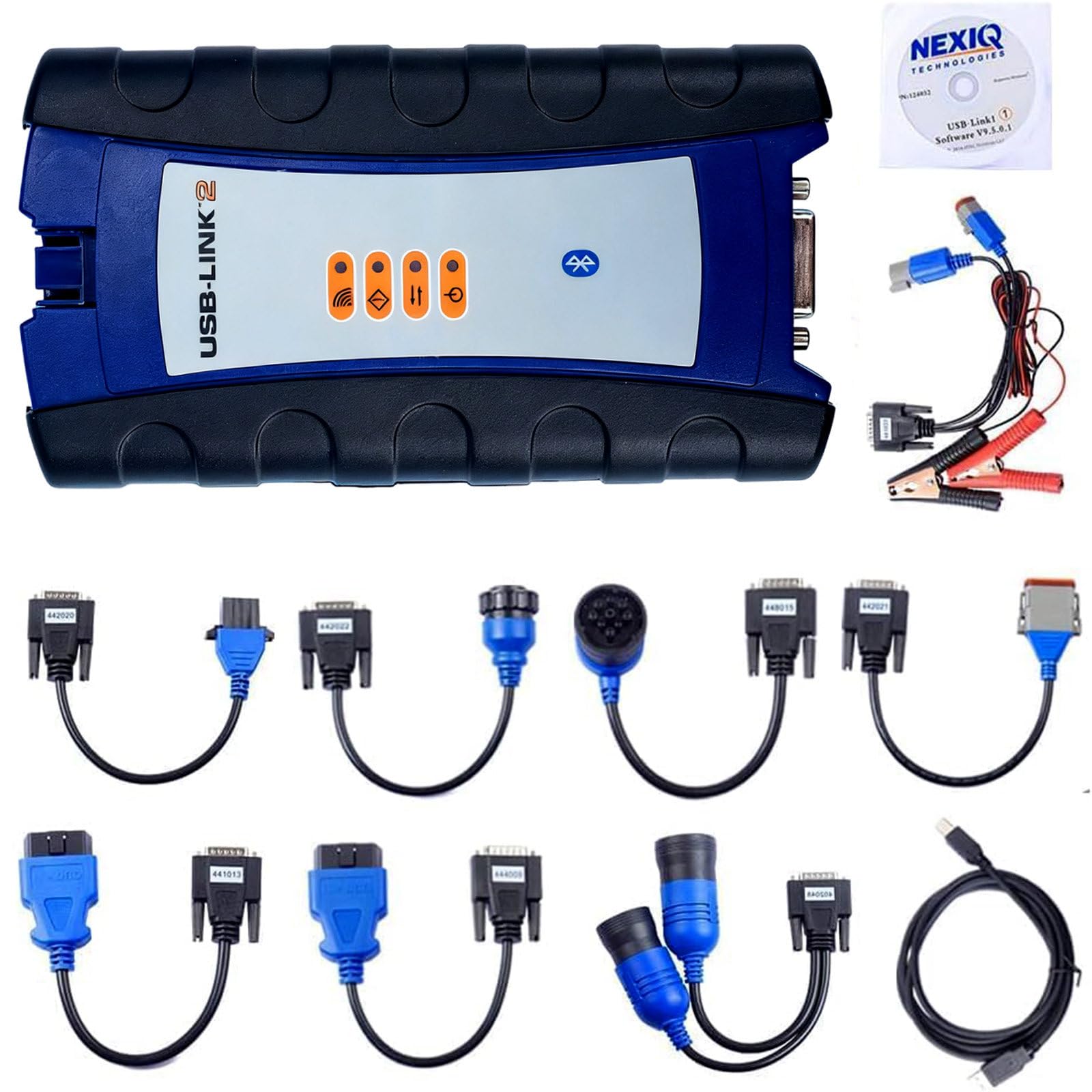



★【Applicable to】:For Nexiq USB Link 2 Heavy Duty Truck Scanner Diagnosis USB Link 2 Interface A dapter.Please use it with supporting software.The machine is not compatible with the Original software. You Need to download the software on the CD that Comes With the product. You need to download it yourself.You need to turn off your anti-virus software before installation. ★【Support system】: IT WORKS ONLY IN XP and Windows 7 (Hino Perkins Cat software must be used on xp system, orther software can be used on win 7 32bit)For Hino, Cat and software, please install them on Windows XP only, other vehicle software can be installed on Win 7. NOT compatible Windows 10. NOT including software. Please use it with supporting software in our package. ★【Multi brand compatibility】: Nexiq diagnostic tools typically have extensive multi brand compatibility and can be used for heavy-duty commercial vehicles, construction machinery, and diesel engines from different manufacturers, making them versatile tools.Advanced fault diagnosis: These tools provide advanced fault diagnosis functions, which can quickly and accurately identify and report problems and faults of vehicles or equipment, helping to reduce maintenance time and costs. ★【Package】: For NEXIQ-2 usb-link main interface, for OBD II A dapter(441013), for J1962 OBD II A dapter(444009), for 6- and 9-pin Deutsch A dapter(402048 ), for Volvo 14-Pin A dapter(442022), for Volvo 8-Pin A dapter(442020), for Komatsu 12-pin A dapter(442021), for CAT 9-Pin A dapter(448015), for 3-pin Deutsch A dapter with male and female connector(441033), for USB cable, for CD, for USB-Link Installation and Setup Manual. ★【Notice】:It Can Not Be Updated, Otherwise, The Multiplexer Will Be Damaged.When you change time of your laptop, Cummins Inline software will get locked, The machine is not compatible with the original OE software. You need to download the software on the U Disk that comes with the product. please download the attached file “how-to-unlock-cummins-inline" to solve it.Before install the software CD,pls reinstall your computer system first,otherwise the multiplexer will be damaged. Product Description
Specification:
1. Support system: XP and windows 7 (for Volvo Hino Perkins Cat software must be used on xp system, other software can be used on win 7 32bit)
2. Compatible with applications that diagnose engines, transmissions, ABS, instrument panels and more.
3. Reduce reprogramming times with direct USB connection, can also connect via bluetooth.
4. Mixed fleet capabilities with broad protocol support, Quick access to vehicle data for maintenance or management reports. Quickly attaches to vehicle's diagnostic connector.
NEXIQ-2 USB Link Bluetooth WiFi Edition Packed Software and Application:
For Allison
For Bendix 6.3.8.0
For Detroit Diesel DDDL 7.05
For Detroit Diesel DDCT
For Detroit Diesel Calibration Tool
For Eaton Service Ranger 3.2
For International DLB
For International ICAP, IPTS, NETS, IPC
For International Master Diagnostic
For Meritor and Wabco Diagnostics
For Cummins Insite 7.5
For Hino 2.0.2.
For Caterpillar 2.0.1.0
For Perkins EST 2010B
For V Macks 2.6.12
For V Macks Dealer Pro
For Volvo VCADS 2.35.10
For To yota Techstream for car
Notice:
1. For Volvo, Hino, Cat and software, please install them on Windows XP only, other vehicle software can be installed on Win 7.
2. It Can Not Be Updated, Otherwise, The Multiplexer Will Be Damage, If you need to install software, all software needs to have drivers set up after installation to work.
3. When you change time of your laptop, for Cummins Inline software will get locked, please download the attached fileow-to-unlock-cummins-inline" to solve it.
4. Before install the software CD,pls reinstall your computer system first,otherwise the multiplexer will be damaged.
Specification:
1. Support system: XP and windows 7 (for Volvo Hino Perkins Cat software must be used on xp system, other software can be used on win 7 32bit)
2. Compatible with applications that diagnose engines, transmissions, ABS, instrument panels and more.
3. Reduce reprogramming times with direct USB connection, can also connect via bluetooth.
4. Mixed fleet capabilities with broad protocol support, Quick access to vehicle data for maintenance or management reports. Quickly attaches to vehicle's diagnostic connector.
NEXIQ-2 USB Link Bluetooth WiFi Edition Packed Software and Application:
For Allison
For Bendix 6.3.8.0
For Detroit Diesel DDDL 7.05
For Detroit Diesel DDCT
For Detroit Diesel Calibration Tool
For Eaton Service Ranger 3.2
For International DLB
For International ICAP, IPTS, NETS, IPC
For International Master Diagnostic
For Meritor and Wabco Diagnostics
For Cummins Insite 7.5
For Hino 2.0.2.
For Caterpillar 2.0.1.0
For Perkins EST 2010B
For V Macks 2.6.12
For V Macks Dealer Pro
For Volvo VCADS 2.35.10
For To yota Techstream for car
Notice:
1. For Volvo, Hino, Cat and software, please install them on Windows XP only, other vehicle software can be installed on Win 7.
2. It Can Not Be Updated, Otherwise, The Multiplexer Will Be Damage, If you need to install software, all software needs to have drivers set up after installation to work.
3. When you change time of your laptop, for Cummins Inline software will get locked, please download the attached fileow-to-unlock-cummins-inline" to solve it.
4. Before install the software CD,pls reinstall your computer system first,otherwise the multiplexer will be damaged.