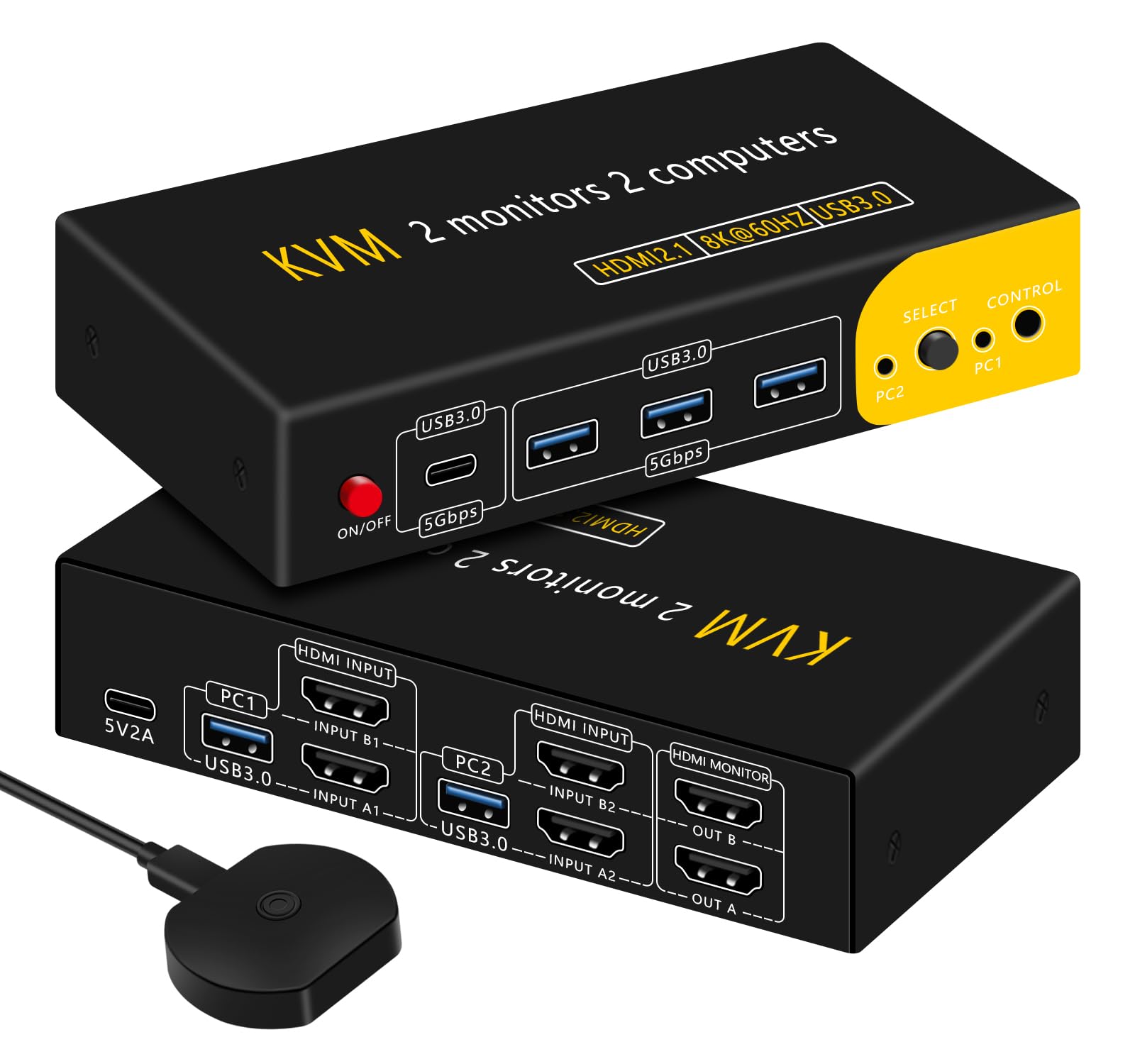



【KVM Switch 2 monitors 2 computers】 8K@60HZ USB3.0 HDMI KVM Dual Monitor Switch allows you 2 computers 2 monitors 1 set of USB keyboard and mouse shared switching. Includes 3 USB-A ports and 1 USB-C port, with the USB-C port can be compatible with more USB devices. The output has 2 HDMI ports for connecting 2 monitors. You can use two modes, Duplicate Mode: both monitors display the same screen and Extended Mode: both monitors display different screens. Note: Your computer needs to have 2 HDMI output ports to support dual screen display. 【Recommended Switching Methods】Dual monitor kvm switcher has 2 switching methods: key switching and desktop controller switching. Recommended to use desktop controller switching, switcher host and cable can be stacked in a place far from the desktop, desktop clean and tidy, more suitable for business offices. The switching response time of the two switching modes is about 2-5 seconds, depending on your host and monitor configuration. This model does not support keyboard hotkey switching. 【HD 8K@60HZ and USB3.0】 HDMI KVM switch supports resolutions such as 8K@60HZ, 4K@120HZ, 1K@144HZ. It also has 4 USB3.0 ports, including 3 USB-A and 1 USB-C, which can be compatible with more USB devices. USB transfer rate is up to 5Gbp/s, widely compatible with many kinds of mice and keyboards, etc. (wireless bluetooth keyboards are not supported), and it also supports printers, scanners, and USB cameras. Support Windows/Vista/XP and Mac OS, Linux and Unix. It can bring you a good experience. Note:The USB-C port does not support video transmission. 【Both a KVM switch and a USB switch】If you don't need to share a monitor and don't connect the HDMI part of the cable, it's a USB switcher, you can share 4 USB devices and switch them between 2 computers. At the same time, you can also use it as an HDMI switch without connecting the USB, and 2 computers can share 2 monitors. 【Power on and off the switch with one click】 The dual KVM switch is designed with a power switch that allows you to turn off the power of HDMI and USB with one click when not in use, which avoids the influence of the lights of the keyboard and other devices. You can have a better experience and also improve the stability and service life of the KVM switch. 【Packing List】Dual monitor KVM switch kit includes 1 x 2*2 HDMI KVM switch, 1 x 1.5m desktop controller, 2 x 1m USB3.0 cables, 1 x 1m USB power cable, 1 x 5V 2A charger, and 1 x user manual. If there is any problem with usage, please contact us via Amazon order number. Note:Users are required to provide their own HDMI cables (6 in total). Products HDMI KVM switch can two sets of high-definition video sources and USB interface to realize two choose one free switching, so that 2 hosts share 2 monitors and a set of keyboard and mouse and other USB devices. The device has excellent image processing and transmission capabilities, so that the output signal is more smooth and stable, is a reliable, high-performance, efficient HDMI and USB switching. Product Features Supports a set of keyboard and mouse and 2 monitors to control 2 hosts Supports Unix/Windows/MacOSX and other Linux-based operating systems. Supports up to 4K 3840*2160@60HZ resolutions. Hot-swappable, all devices connected to the KVM can be added or subtracted at any time without shutting down the host computer. Supports desktop controllers and panel buttons to control KVM in two ways Supports seamless switching between keyboard and mouse, no delay in switching hosts, no need to reinstall drivers Supports additional standard USB3.0 ports for USB3.0 devices such as scanner guns, USB flash drives, removable hard drives, etc., and can be switched with the port. packing list 2X2 switcher 1 pc Desktop controller 1pc USB 3.0 cable 2 pcs USB power supply cable 1pc Instruction manual 1pc Connection Steps 1, before using the KVM switch, please make sure that the resolution and refresh rate of the host output are compatible with the switch and your monitor, otherwise it may not be displayed after connection. 2, with 2 groups of HDMI (a total of 4) and USB cable (a total of 2) were connected to 2 computers and switches corresponding to the PC1 group and PC2 group of ports, HDMI cable and USB cable must be accessed, otherwise you can not share the video keyboard and mouse! 3, the keyboard and mouse into the KM port group (KM-H202A-2, KM-H202B-2 two must be connected to the keyboard to this port, otherwise it can not realize the hot key switching function), U disk and other peripherals into the USB port group 4, OUTPUT port to connect two HDMI displays; SW port to connect an external desktop controller 5, connect the 5V USB power supply line. kvm switch,kvm switches,kvm switch 2 monitors 2 computers,kvm switch 1 monitors 2 computers,kvm switch 2 computers 2 monitors,dual monitor kvm switch,kvm switch displayport,kvm switch 3 monitors 2 computers,kvm switch dual monitor,hdmi kvm switch,kvm switch 4 computers,kvm switch 2 computers