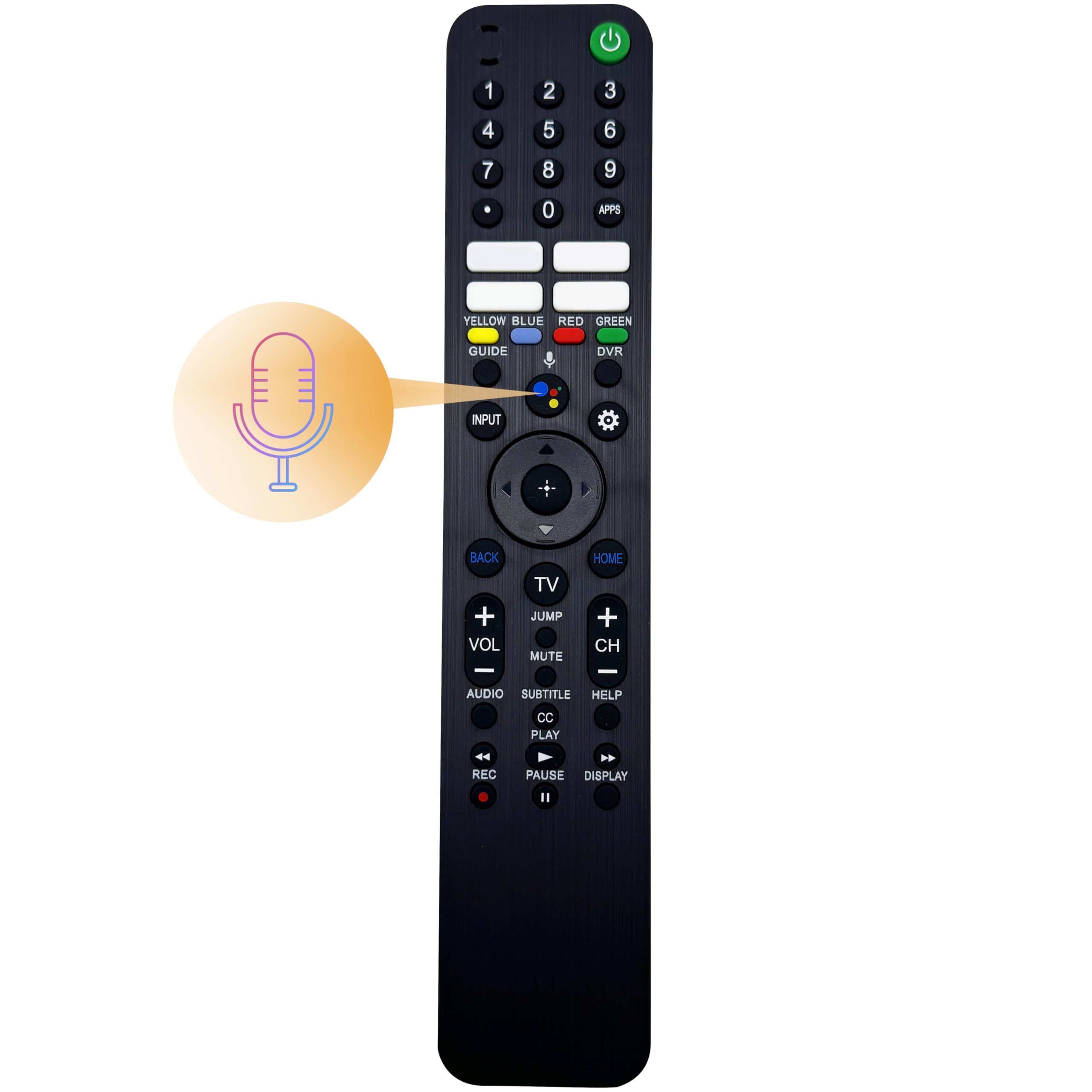



Voice command remote control replacement, supporting Google Assistant; press the Voice button and say "voice hints" for more operation tips. A perfect substitute of these remote controls: RMF-TX920U, RMF-TX910U, RMF-TX900U, RMF-TX820U, RMF-TX811U, RMF-TX810U, RMF-TX800U, RMF-TX621U, RMF-TX611B, RMF-TX611U, RMF-TX600U, RMF-TX520U, RMF-TX520B, RMF-TX500U, having 4 preset app buttons and voice search makes it easier for finding favorite shows. Works with Sony KD, XR, XBR smart Android and Google TV models released from 2018-2024 years, including HD, FHD, 4K, 8K LED and OLED TVS; Compatible with series of A75L, A80CK, A80K, A80CL, A80J, A80L, A8H, A90J, A90K, A95K, A95L, A9G, A9S, BRAVIA 3/ 7/ 8/ 9, W830K, X750H, X75CH, X75K, X77CL, X77L, X79J, X800H, X80CH, X80CK, X80J, X80K, X81CH, X850G, X85J, X85K, X900H ,X90CH, X90CK, X90CL, X90J, X90K, X90L, X92, X91J, X93CL, X93L, X950G, X950H, X95J, X95K, X95L, Z8H, Z9G, Z9J, Z9K. Requires 2 AAA batteries (NOT Included); No need to set up, pair or program under IR (infrared) mode, saving time to replace an old or defective remote control smoothly; For more functionalities, pairing it to the television recommended. Energy saving, comfortable button design for great using experience; longer operating range with voice control, easy for controlling your TV when you are not in front of it; Comes with a user guide, one year warranty from order date included; Any inquiries will get replied within 24 hours by nice customer support. The remote control will work out of packaging under infrared mode without any setting. For best performance, we strongly suggest you pairing it with the smart TV. That way you can use the voice search and other features of the remote.
To pair the remote control with the TV, please press and hold both the Vol – (down) and Voice buttons for 3 seconds and then you'll see Connecting..., when the message 'The new remote has been connected' appears, select OK.
If your TV has paired with a lost or broken remote, please unpair it first. To unpair the remote control from the TV, please do as follows.
Press the setting button (the gear mark) on the remote or select it on TV home page, depending on the model. Then unpair previous remote on Remotes & Accessories page.
Please refer to the TV user manual when using the remote control. It will help you understand the functions of every button. Generally, the user manual is available on manufacturer's website. If you need assistance, feel free to contact us.
Compatible TVs:
2022 LED and Bravia XR OLED Smart Google TV models
W830K Series
2021 LED and Bravia XR OLED Smart Google TV models
A80J Series Bravia XR
A90J Series Bravia XR
X79J Series
X80J Series
X85J Series
X90J/ X92 Series Bravia XR
X91J Series
X95J Series Bravia XR
Z9J Series Bravia XR
2020 LED and Bravia OLED Smart Android TV models
A8H Series Bravia
A9S Master Series Bravia
X750H/ X75CH Series
X800H Series
X80CH Series
X81CH Series
X900H Series
X90CH Series
X950H Series
Z8H Series
2019 LED and Bravia OLED Smart Android TV models
A9G Master Series Bravia
X850G Series
X950G Series
Z9G Master Series
Notice: Please point the remote control to your TV when operating it.
Warranty: Refund available within 30 days, exchange available within 12 months from purchase date.
To pair the remote control with the TV, please press and hold both the Vol – (down) and Voice buttons for 3 seconds and then you'll see Connecting..., when the message 'The new remote has been connected' appears, select OK.
If your TV has paired with a lost or broken remote, please unpair it first. To unpair the remote control from the TV, please do as follows.
Press the setting button (the gear mark) on the remote or select it on TV home page, depending on the model. Then unpair previous remote on Remotes & Accessories page.
Please refer to the TV user manual when using the remote control. It will help you understand the functions of every button. Generally, the user manual is available on manufacturer's website. If you need assistance, feel free to contact us.
Compatible TVs:
2022 LED and Bravia XR OLED Smart Google TV models
W830K Series
2021 LED and Bravia XR OLED Smart Google TV models
A80J Series Bravia XR
A90J Series Bravia XR
X79J Series
X80J Series
X85J Series
X90J/ X92 Series Bravia XR
X91J Series
X95J Series Bravia XR
Z9J Series Bravia XR
2020 LED and Bravia OLED Smart Android TV models
A8H Series Bravia
A9S Master Series Bravia
X750H/ X75CH Series
X800H Series
X80CH Series
X81CH Series
X900H Series
X90CH Series
X950H Series
Z8H Series
2019 LED and Bravia OLED Smart Android TV models
A9G Master Series Bravia
X850G Series
X950G Series
Z9G Master Series
Notice: Please point the remote control to your TV when operating it.
Warranty: Refund available within 30 days, exchange available within 12 months from purchase date.