Olivechard InCell for iPhone 13 Pro Screen [120Hz Promotion+Proximity Sensor Cable] Screen Replacement Display Touch Digitizer Assembly A2638 A2483
$40.24
by Olivechard



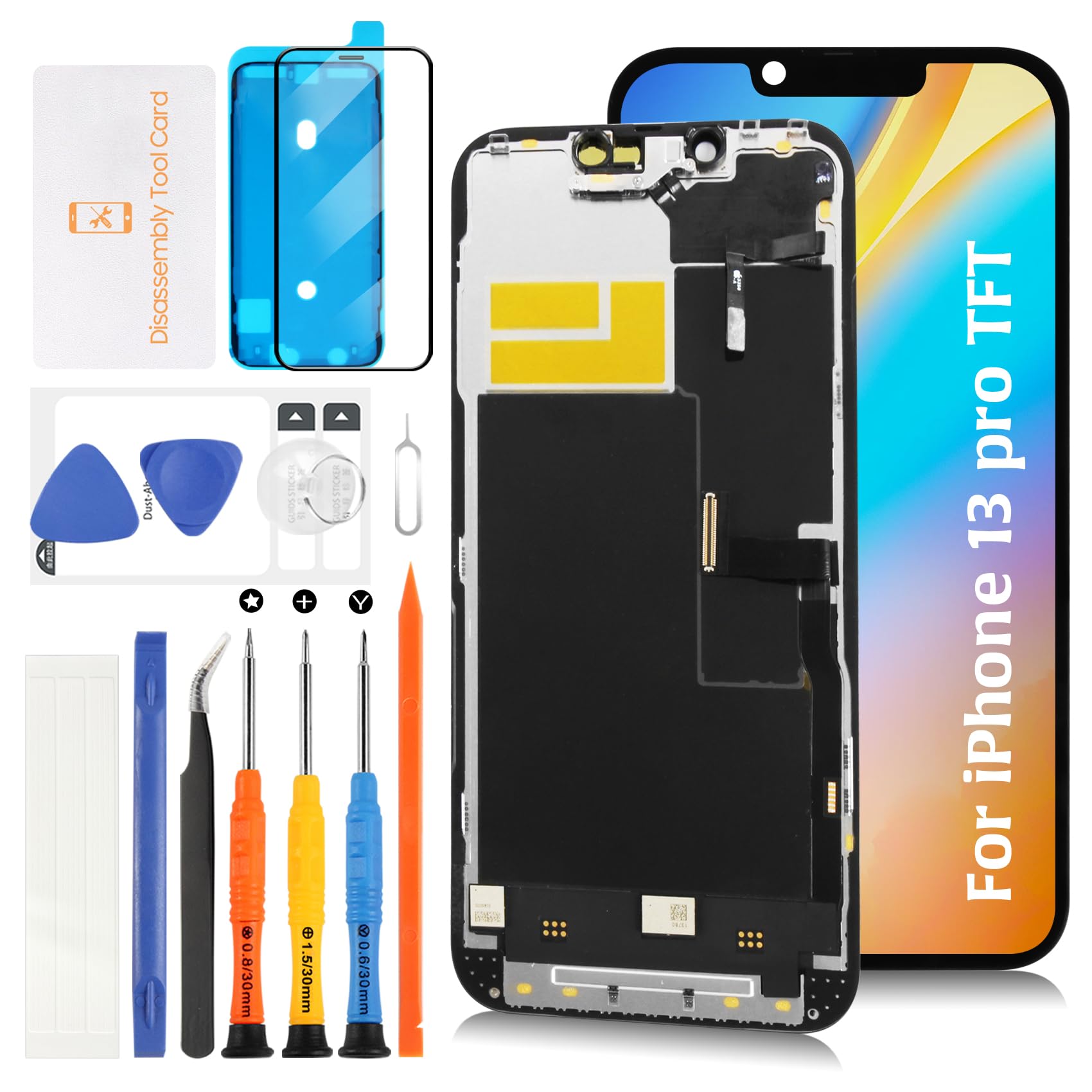
⛳【TFT LCD, 120Hz ProMotion, & Pre-Installed Proximity Sensor Cable】This product adopts a TFT LCD For iPhone 13 Pro, which differs from the original OLED in brightness, contrast, color vibrancy, thickness, and power consumption. While it is a cost-effective alternative, those who prioritize display quality should take note. Supports 120Hz ProMotion, ensuring a smooth touch experience. Additionally, the sensor cable is pre-installed, making the installation process easier. 🎯【Similar Notch Size & Compatibility】For iPhone 13 Pro 6.1-inch TFT LCD screen replacement kit. Compatible with models A2638, A2483, A2636, A2639, and A2640. Ideal for replacing broken screens, display failures, dead pixels, touch malfunctions, and non-functional LCDs. Please confirm whether the issue is caused by the LCD or the touch panel before purchasing. 🎯【Package Contents】For iPhone 13 Pro LCD panel assembly with Proximity Sensor ×1, waterproof adhesive ×1, repair tool kit ×1, screwdriver set ×1, pry bar ×1, double-sided adhesive tape ×1, tempered glass screen protector ×1, tweezers ×1, and an opening card ×1 (please refer to the images). The transparent protective films on the surface may have slight marks, which is normal. Once the inspection confirms no issues, you can remove the film for use. ⛳【Installation Precautions】This product does not include an installation manual. If you have repair experience and the necessary tools, please refer to YouTube tutorials for guidance. If you are inexperienced or unfamiliar with repair tools, we strongly recommend seeking professional repair services. Before installation, carefully connect the flex cables and test for proper functionality. Parts damaged during installation will not be eligible for return. 🎯【After-Sales Service】Each touch panel undergoes a thorough quality inspection by a professional QC team before shipment. We offer replacements for non-human damages. For inquiries regarding installation, package details, or product information, feel free to contact us via Amazon messages. If you receive a damaged package, please provide photos and contact us promptly. Returns and exchanges can be processed within the designated period. We guarantee high-quality customer support. Olivechard LCD Screen Replacement is a compatible replacement display for iPhone 13 Pro.
This replacement screen uses incel LCD technology, providing a clear and stable display suitable for daily use.with Proximity Sensor and 120Hz ProMotion
🔹 Compatibility:
✔ For iPhone 13 Pro (6.1 inches) models: A2638, A2483, A2639, A2636, A2640
❌ Not compatible with 13 / 13 Pro Max / 13 Mini
🔹 Product Features:
✔ TFT LCD technology provides balanced brightness and display performance.
✔ Supports 120Hz refresh rate.
✔ Includes proximity and ambient light sensor cable for proper functionality.
✔ Notch size designed to fit the 13 Pro housing.
✔ Includes basic repair tools for screen replacement use.
🔹 Technical Notes:
📌 Display quality and power consumption may differ from the original OLED display.
📌 The fingerprint and Face ID functions are not included in this product. The original sensor components should be transferred from the previous screen during installation.
📌 Please ensure all cables are properly connected before turning on the device.
📌 Installation requires professional skills. Incorrect installation may cause damage to the device or display.
🔹 Package Contents:
📦 1x For iPhone 13 Pro TFT LCD Replacement Screen
🛠 1x Screwdriver Set
🔧 1x Opening Tool Kit
📌 1x Waterproof Adhesive Seal
📱 1x Screen Protector
📖 1x Installation Instruction Card
📋 FAQ:
Q1: Does this screen support 120Hz refresh rate?
✔ Yes, the display supports 120Hz refresh rate for smooth operation.
Q2: How does it differ from the original OLED screen?
✔ The TFT LCD uses different materials, with slight variations in color and brightness compared to OLED screens.
Q3: Will Face ID work after installation?
✔ The Face ID function can work if the original sensor module is transferred from the old screen correctly.
Q4: What should I check before installation?
✔ Disconnect the battery, connect the flex cables temporarily, and test the screen function before final assembly.
Q5: What should I do if the screen does not work properly after installation?
✔ Check all connections and try reconnecting the battery. If the issue persists, please contact customer service through Amazon Messages.
This replacement screen uses incel LCD technology, providing a clear and stable display suitable for daily use.with Proximity Sensor and 120Hz ProMotion
🔹 Compatibility:
✔ For iPhone 13 Pro (6.1 inches) models: A2638, A2483, A2639, A2636, A2640
❌ Not compatible with 13 / 13 Pro Max / 13 Mini
🔹 Product Features:
✔ TFT LCD technology provides balanced brightness and display performance.
✔ Supports 120Hz refresh rate.
✔ Includes proximity and ambient light sensor cable for proper functionality.
✔ Notch size designed to fit the 13 Pro housing.
✔ Includes basic repair tools for screen replacement use.
🔹 Technical Notes:
📌 Display quality and power consumption may differ from the original OLED display.
📌 The fingerprint and Face ID functions are not included in this product. The original sensor components should be transferred from the previous screen during installation.
📌 Please ensure all cables are properly connected before turning on the device.
📌 Installation requires professional skills. Incorrect installation may cause damage to the device or display.
🔹 Package Contents:
📦 1x For iPhone 13 Pro TFT LCD Replacement Screen
🛠 1x Screwdriver Set
🔧 1x Opening Tool Kit
📌 1x Waterproof Adhesive Seal
📱 1x Screen Protector
📖 1x Installation Instruction Card
📋 FAQ:
Q1: Does this screen support 120Hz refresh rate?
✔ Yes, the display supports 120Hz refresh rate for smooth operation.
Q2: How does it differ from the original OLED screen?
✔ The TFT LCD uses different materials, with slight variations in color and brightness compared to OLED screens.
Q3: Will Face ID work after installation?
✔ The Face ID function can work if the original sensor module is transferred from the old screen correctly.
Q4: What should I check before installation?
✔ Disconnect the battery, connect the flex cables temporarily, and test the screen function before final assembly.
Q5: What should I do if the screen does not work properly after installation?
✔ Check all connections and try reconnecting the battery. If the issue persists, please contact customer service through Amazon Messages.