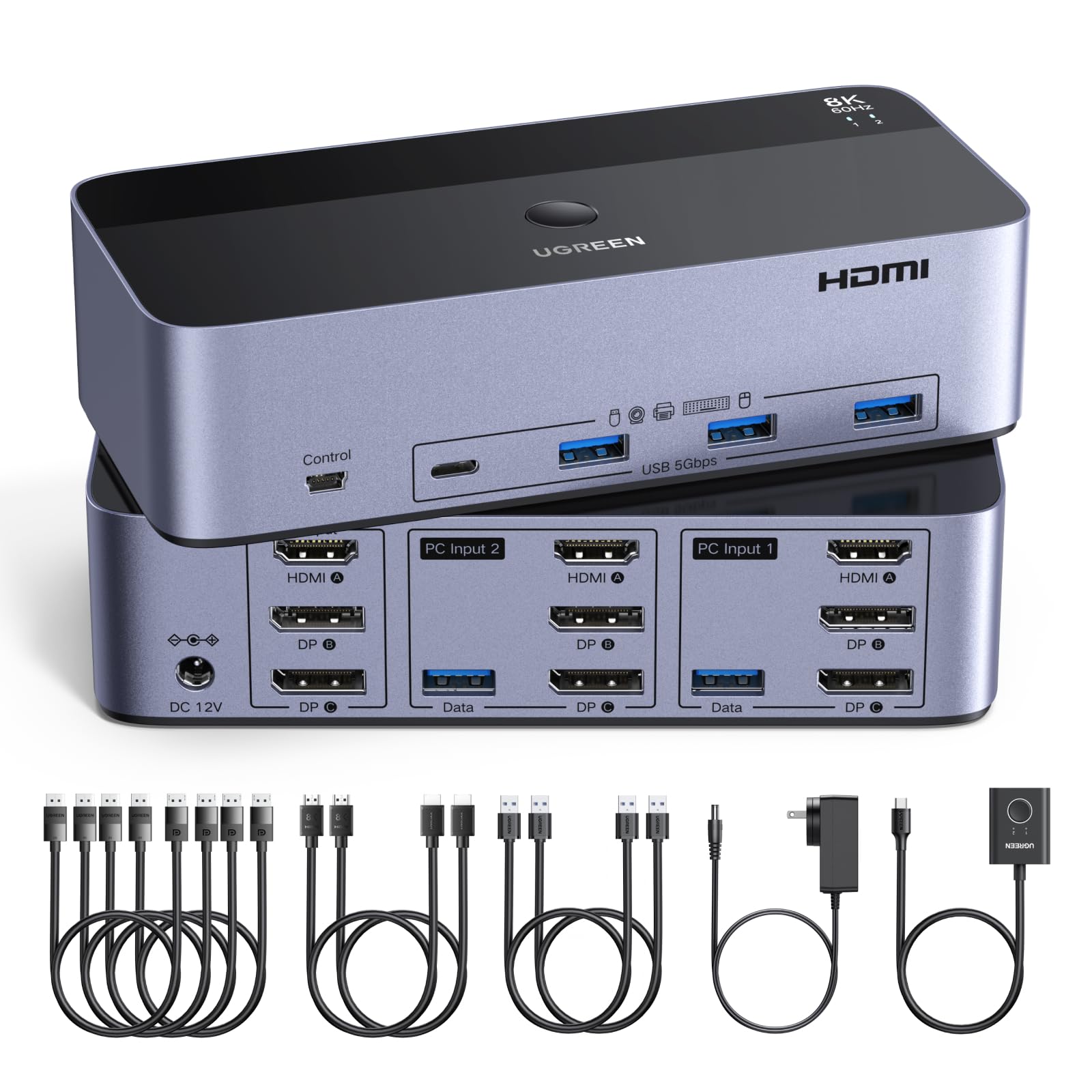
KVM Switch 3 Monitors 2 Computers: This 2*Displayport + 1*HDMI KVM Switches allows you to switch effortlessly between two computers with one click — share 3 monitors and 4 USB 3.0 ports (keyboard, mouse, printer, webcam) without swapping cables. Space-saving KVM for home offices, content creators, and IT professionals. NOTE: Both computers must support triple-monitor output to use all 3 displays simultaneously. If either PC only supports 1 or 2 displays, the extra monitor(s) won’t activate Ultra HD 8K@60Hz/4K@240Hz Resolution: This USB KVM switch output features two DisplayPort 1.4 ports + one HDMI 2.1 port, each supporting up to 8K@60Hz resolution, and backward compatible with 8K@30Hz, 4K@240Hz/144Hz/120Hz/60Hz/30Hz. It also supports HDR10+, HDCP 2.3/1.4, VRR, FreeSync, and G-Sync, eliminating screen tearing and stuttering across three monitors, even at high frame rates. NOTE: If need to achieve 8K resolution, your computers and monitors both need to support 8K@60Hz resolution, and please make sure the length of your cables are within 2 meters 28AWG Two Switching Ways & Two Dispaly Modes: This KVM switch displayport HDMI supports button switching and desktop controller switching, freely switch between 2 computers. With the desktop controller, you can place this monitor switch for 2 computers outside your work area, making your desktop cleaner and tidier. Two Dispaly Modes, Mirror mode: Triple monitors output the same images, Extend mode: Triple monitors output different images. NOTE: Not support Keyboard shortcuts (hotkeys) toggles Wide Compatibility & Package List: This triple monitor KVM switch driver-free and plug and play, and supports Windows, MacOS, and Linux systems. (Note: If your laptop only has USB-C ports, please use "a USB-C to USB-A OTG adapter + the included USB-A cable" to connect to the KVM switch's USB-A port.) PACKAGE LIST: 1*KVM switch, 4*DP cables, 2*HDMI cables, 2*USB A cables, 1*power adapters, 1*desktop controller, 1*user guide NOTE: 1, To ensure normal usage, please make sure to connect the power supply via the power adapter. 2, To display content across three screens simultaneously, make sure each of your PC is equipped with 2 DisplayPort ports + 1 HDMI port. 3, Each computer at the input needs to be connected with 2* DP cables + 1* HDMI cable+1* USB cable. 4, Please make sure your PC supports 3 screens or above display function before purchasing. 5, If a signal converter or docking station is used, there may be compatibility issues. 6, NOT support EDID emulation
This 2*Displayport + 1*HDMI KVM Switches allows you to switch effortlessly between two computers with one click — share 3 monitors and 4 USB 3.0 ports (keyboard, mouse, printer, webcam) without swapping cables. Space-saving KVM for home offices, content creators, and IT professionals.
This USB KVM switch output features two DisplayPort 1.4 ports + one HDMI 2.1 port, each supporting up to 8K@60Hz resolution, and backward compatible with 8K@30Hz, 4K@240Hz/144Hz/120Hz/60Hz/30Hz. It also supports HDR10+, HDCP 2.3/1.4, VRR, FreeSync, and G-Sync, eliminating screen tearing and stuttering across three monitors, even at high frame rates. NOTE: If need to achieve 8K resolution, your computers and monitors both need to support 8K@60Hz resolution, and please make sure the length of your cables are within 2 meters 28AWG.
This KVM switch displayport HDMI supports button switching and desktop controller switching, freely switch between 2 computers. With the desktop controller, you can place this monitor switch for 2 computers outside your work area, making your desktop cleaner and tidier. Two Dispaly Modes, Mirror mode: Triple monitors output the same images, Extend mode: Triple monitors output different images. NOTE: Not support Keyboard shortcuts (hotkeys) toggles.
This triple monitor KVM switch driver-free and plug and play, and supports Windows, MacOS, and Linux systems. PACKAGE LIST: 1*KVM switch, 4*DP cables, 2*HDMI cables, 2*USB A cables, 1*power adapters, 1*desktop controller, 1*user guide.
NOTE: 1, To ensure normal usage, please make sure to connect the power supply via the power adapter. 2, To display content across three screens simultaneously, make sure each of your PC is equipped with 2 DisplayPort ports + 1 HDMI port. 3, Each computer at the input needs to be connected with 2* DP cables + 1* HDMI cable+1* USB cable. 4, Please make sure your PC supports 3 screens or above display function before purchasing. 5, If a signal converter or docking station is used, there may be compatibility issues. 6, NOT support EDID emulation.