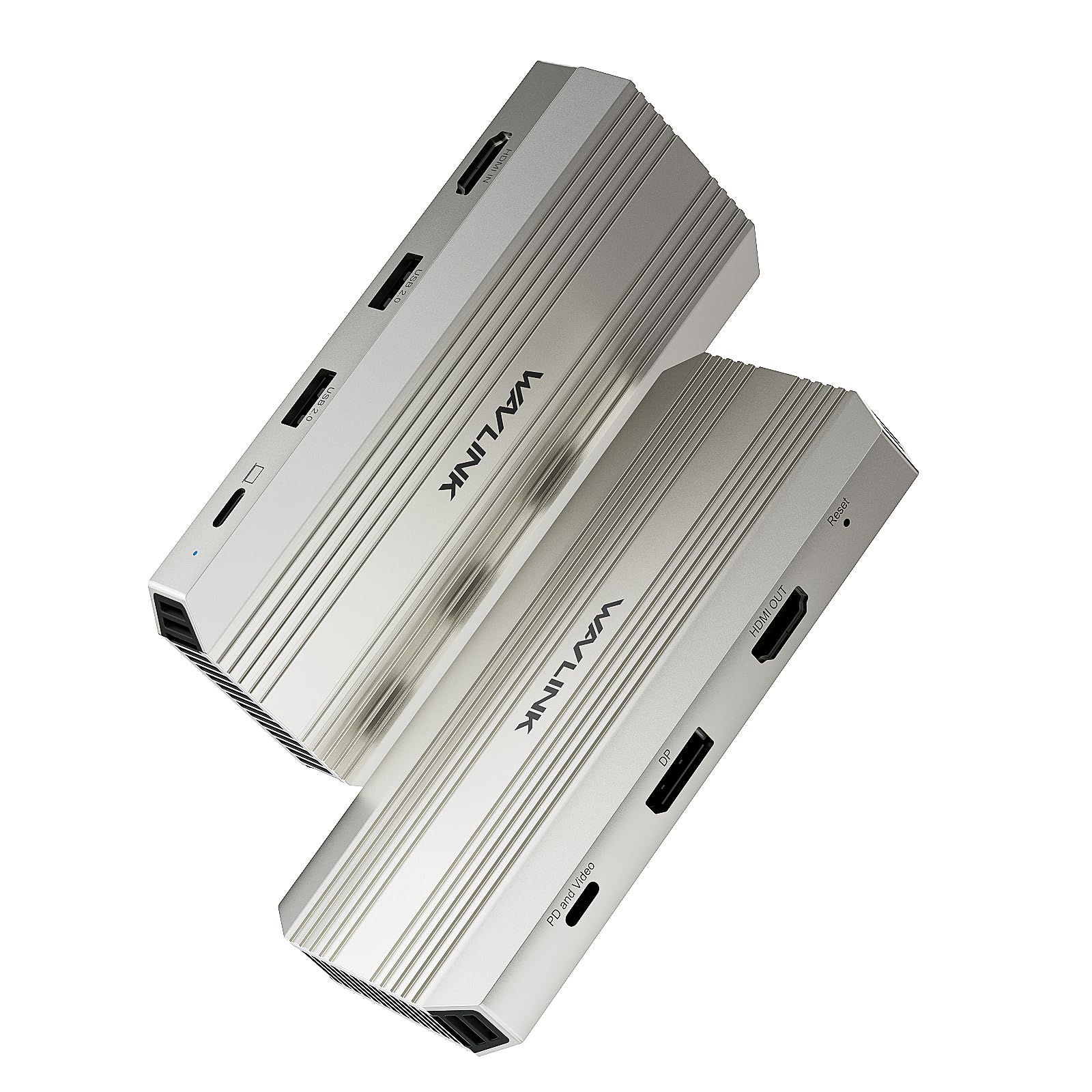



Professional Efficiency Improvement - If you are a personal creator, gamer, remote worker or need to work in multiple scenarios, then you have to take a look. There is such a Video Capture Card that can provide you with 4K@30Hz Capture& Loop-Out, Single 4K@144Hz Display, and 100W power input, USB2.0 for wireless devices. It can greatly improve work efficiency and keep the desktop tidy. What do you think? 4K HDMI Capture Card for Streaming - Experience crystal-clear 4K@30Hz video capture and an ultra-responsive, low-latency 4K@30Hz HDMI loop-out for uninterrupted gameplay or real-time monitoring. Supports high-fidelity uncompressed video in RGB/YCbCr formats for superior image quality from your PS5, Xbox, Switch, or camera. 4K@144Hz HDR - If you are a gamer or video producer, you know what 4K@144Hz means. This capture card transform your laptop into a workstation with stunning single 4K@144Hz HDR display output via DisplayPort or the "PD and Video" USB-C port(under DP1.4). Video Capture Card with 100W Power Delivery - Say goodbye to low battery! Video capture card with 100W power delivery, 90W for laptop charging. Our products do not come with a charger, please use a 20V/5A/100W charger. Please confirm your computer charging power, it will not charge if it is higher than 90W. Pls Note - Please make sure that the computer's Type C port supports charging and video output. The USB-C Host and HDMI IN cannot work simultaneously, if they are connected at the same time, the HDMI IN captures the video first. If you have selected the DP port to extend or mirror your computer's screen, the PD and Video port can only act as a Power IN. Computers with Mac OS can only extend one different screen and prioritize HDMI capture "Systems/ Devices Compatibility - Microsoft Windows 7/8/10/11 - Apple Mac OS 10.8 or later(Can extend a different display ONLY) Multiple Display Resolution (Max. Resolution) Notice: Please make sure the type-C port of your host supports video output. Single Display: PD and Video: 4K@144Hz DisplayPort: 4K@144Hz Dual Display: PD and Video+HDMI OUT: 4K@60Hz+4K@30Hz DisplayPort+HDMI OUT: 4K@60Hz+4K@30Hz Specification: 1.Model: WL-VR204 2.Ports: Front: HDMI IN port (4K@30Hz); 2 x USB 2.0 port (up to 480Mbps); USB-C Host (4K@30Hz); Rear: PD and Video port (Single 4K@144Hz,PD IN 100W); DP port (Single 4K@144Hz); HDMI OUT port (4K@30Hz). 3.Unit Size: LxW×H:13.4cm×6.2cm×1.7cm/5.27inch×2.44inch×0.67inch 4.USB-C to C Cable Length: 100cm/39.4in 5.Unit Weight: 127g/4.4oz 6.Material: Aluminum housing Features - Supports capturing every detail of gameplay, streaming video, live broadcasts with one 4K@30Hz HDMI IN and one USB-C host. - Supports loop-out for an immersive and clear viewing experience with a 4K@30Hz HDMI OUT. - Supports working with third party software to capture or stream your HD game or other HD video sources and enhance your workflow with ultra-low latency technology. - Supports up to a single 4K@144Hz extend with one DP, one PD and Video port. - Supports PD pass-through IN 100W for capture card and 90W charging for upstream USB-C host with one USB-C PD. - Supports stable and reliable data transfer with two USB-A ports. - Plug and play, driver free, easy to set up. - Supports highly effective heat dissipation with full aluminium case. - Supports MST mode for Windows and SST mode for Mac OS. In the Box - 1×MST 4K HDMI Video Capture Card - 1×10G USB-C to USB-C Cable with E-Mark - 1×Quick Start Guide Warm Tips: 1.To fully utilize all features of this hub, including video output (via DisplayPort or the 'PD and Video' USB-C port) and Power Delivery charging to the laptop, the connected laptop's USB-C port must support DisplayPort Alt Mode (DP1.4 or higher is recommended for optimal performance with high resolutions/refresh rates) and Power Delivery (PD) input. 2.The USB-C Host and HDMI IN cannot work simultaneously, if they are connected at the same time, the HDMI IN captures the video first. 3.If you have selected the DP port to extend or mirror your computer's screen, the PD and Video port can only act as a Power IN, so a connection of power source device is required for PD and Video port. 4.For Windows based Laptop/PC, MST mode is available, one video source is captured and looped out to the HDMI OUT interface, and the other video source is extended to the DP or PD and Video interface. 5.For Mac based Laptop/PC, only SST mode is available, one video source is captured and looped out to the HDMI OUT port, and the other video source is mirrored to DP/PD and Video port.