AirPods Care Tips: How to Keep Your AirPods Working Like New


AirPods might just be one of the most convenient little gadgets Apple ever made. They slip into your pocket, pair in seconds, and feel like magic when you pop them in your ears. But here’s the thing nobody likes to admit: they don’t stay perfect forever. The sound can get muffled. The case picks up scratches. The battery doesn’t last as long as it once did.
Sound familiar? Don’t worry. Most of those issues can be slowed down — or even avoided — with the right care. With a little attention, you can stretch their lifespan way beyond what most people manage. And no, it doesn’t take hours of effort or a bag of fancy cleaning tools. Just a few simple habits.
Let’s dive into the best ways to keep your AirPods working, looking, and sounding like new.
AirPods Care and Maintenance: The Basics
Think of AirPods as tiny computers that happen to sit in your ears. They’re packed with sensors, microphones, batteries, and speakers. That means they deserve more care than the average pair of wired earbuds you’d toss in a drawer.
The golden rules of AirPods care and maintenance are simple: keep them clean, avoid extreme conditions, and always return them to their case when not in use. Tossing them loose into your bag or pocket is asking for scratches, lint buildup, or even accidental damage.
Pro tip: treat the charging case like your AirPods’ home. If they’re not in your ears, they should be in their case. This keeps them protected, topped up on battery, and less likely to get lost.
AirPods Cleaning Tips
Nobody likes to talk about it, but let’s be honest: AirPods get gross. Earwax, dust, and pocket lint build up faster than you’d think. Not only does this look bad, but it can also block the sound and make them less effective.
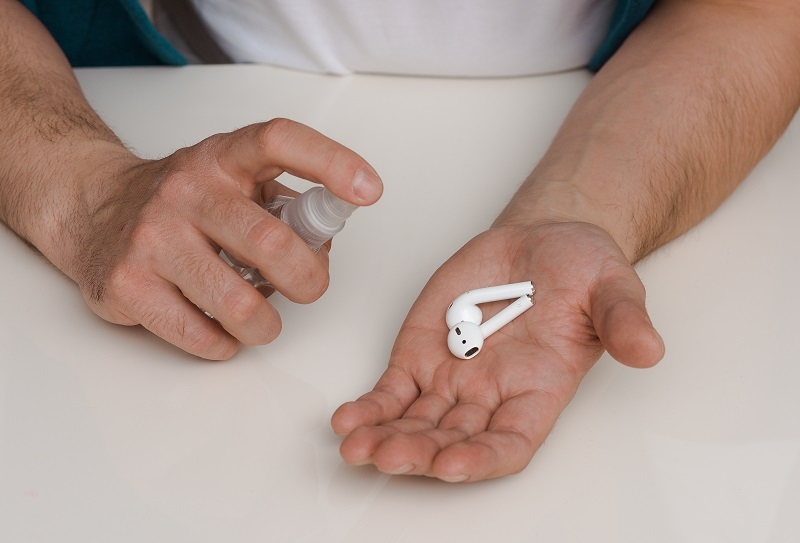
The good news? Cleaning them doesn’t take much. The key is being gentle. Never dunk them in water or scrub with harsh cleaners. Instead, use a soft, dry, lint-free cloth. For tougher spots, a slightly dampened cloth (with water or 70% isopropyl alcohol) works. Just don’t let any liquid seep into the speaker mesh.
As for the tricky earbud grills, a dry cotton swab or a soft-bristled brush works wonders. Some people even swear by using a bit of Blu Tack to gently pull out gunk. Whatever method you use, remember the goal is to be careful. These are delicate.
In short: regular AirPods cleaning tips aren’t about making them sparkle for Instagram — they’re about keeping sound clear and sensors working.
AirPods Battery Life Hacks
One of the first things people notice as their AirPods age? Battery decline. That frustration when your playlist cuts out halfway through a workout because your buds died way earlier than expected.
You can’t completely stop batteries from aging, but you can slow it down with smart habits. First, avoid leaving your AirPods on charge 24/7. Once the case is topped up, unplug it. Lithium-ion batteries last longer when they’re not constantly overcharged.
Second, don’t let them fully drain every time. Running them down to 0% regularly stresses the battery. Instead, try to recharge when they hit around 20–30%.
And third, avoid exposing them to heat. Leaving your AirPods in a hot car or under direct sunlight is brutal on battery health.
These small AirPods battery life hacks can add months — sometimes even a year — of solid performance before you start noticing decline.
AirPods Troubleshooting Guide
Even with great care, AirPods occasionally act up. Maybe one side won’t connect. Or the mic cuts out on a call. Or you hear static that wasn’t there yesterday. Don’t panic. Most issues are fixable with a few quick steps.
Here’s a mini AirPods troubleshooting guide to keep handy:
Check the basics. Make sure Bluetooth is on, your AirPods are charged, and your device’s software is updated.
Clean the contacts. Sometimes connection issues happen because the buds aren’t making proper contact with the charging case. A quick wipe of the case connectors can help.
Reset your AirPods. Hold the setup button on the case until the light flashes amber, then white. Reconnect them like new.
Test with another device. This helps figure out if the problem is the AirPods or your phone.
If none of that works, Apple Support may be your next stop. But honestly, most problems clear up with a reset or a clean — much like the quick fixes users often try first on devices such as the Apple iPad Air 13-inch (M2) before heading to service.
AirPods Replacement Options
Eventually, no matter how careful you are, AirPods wear out. Batteries fade, cases break, or one earbud mysteriously disappears forever (thanks, couch cushions). The good news is, you don’t always have to replace the whole set.
Apple and third-party providers offer AirPods replacement options for individual earbuds or cases. This can be much cheaper than buying a brand-new set. For example, if just the left bud fails, you can order a replacement and sync it with your existing gear.
Another option: trade-in or recycling programs. Apple often offers credit toward new purchases if you send in old AirPods. It’s not always huge savings, but it’s better than tossing them in a drawer.
Bottom line? Don’t assume “dead” AirPods mean buying a whole new set. Check your options first.
AirPods Case Protection Tips
The charging case is easy to overlook, but it’s basically the life-support system for your AirPods. Without it, they’re just expensive paperweights. That’s why protecting it matters.
The simplest step is a case cover. Silicone, leather, hard shell — there are endless options. Covers not only prevent scratches but also make the case less slippery (and easier to spot in the abyss of your bag).
Another habit: avoid putting your AirPods case in the same pocket as keys or coins. Those scratches happen faster than you think.
Also, clean it occasionally. Dust and dirt inside the case can interfere with charging. A gentle brush around the contacts works wonders.
Following these AirPods case protection tips keeps both your case and your earbuds in working shape much longer.
When to Call in Professional Help
There are times when DIY just won’t cut it. If your AirPods stop charging altogether, the sound quality drops drastically despite cleaning, or one side refuses to work even after resets, it may be time for repair or replacement.
Apple’s support system is straightforward — though not always cheap. Third-party repair services are popping up too, but choose carefully. A bad repair can do more harm than good, especially if you’re already juggling other gadgets like a Naxa Electronics Wireless Universal Smart Remote that also need dependable performance.
If your AirPods are still under warranty or AppleCare+, check coverage before spending out of pocket.
Habits That Make the Biggest Difference
At the end of the day, AirPods don’t require a ton of effort to maintain. The biggest wins come from simple, repeatable habits:
Always store them in their case.
Clean them gently and regularly.
Charge smart — not too much, not too little.
Protect the case from scratches and dust.
These little things, done consistently, add up. They keep your AirPods feeling fresh, sounding sharp, and lasting far longer than the average pair.
Final Thoughts
AirPods aren’t just headphones — they’re tiny computers that sit in your ears every day. And like any tech, they need care. By following simple routines, you’ll avoid most of the common issues that frustrate users.
With a little attention, your AirPods can stay reliable for years — long after most people have given up and bought new ones.
This content was created by AI